Load a sample shop into a test tenant
An empty tenant shows you very little. At the end of this guide your test tenant holds a B2B shop you can look at in Cockpit and call over the API: a market, a buyer company with a buyer and an approver, promotions and voucher codes, and up to four catalogues (workshop supply, electrical installation, office supplies, laboratory supplies) of about 100 products each. Each catalogue has list prices with quantity breaks, contract prices for the buyer company, stock, a photo and a close-up for every product, and a data sheet for every model; most models also have a technical drawing, and three of the catalogues have 3D models. You then try a contract price, a promotion, a voucher and a test order on it, and remove it again. Everything is invented, and every record you look up by code carries DEMO- (demo_ where a code allows no hyphen, such as the market demo_de and the attributes). Values inside those records, such as option codes, tax classes, locales and the currency, are plain; What it changes on your tenant lists the few shared records it also creates.
This is for developers and integrators who want realistic records before their own catalogue is in, to try a storefront or an ERP sync against them, or to show revenexx to someone. You need:
- A test tenant, not your production tenant. A tenant is your workspace on the platform (Glossary), and Cockpit is its admin UI; a test tenant is the safe place for this. You need its slug.
- These apps installed from the App Marketplace in Cockpit: the commerce apps Products, Pricing, Inventories, Customers, Promotions, Markets, Channels, Shipping, Payments, Orders and Carts, and the Pages app for the content pages. If one is missing, the loader stops at the first step that needs it and prints the error. Without Pages that is the base's last step, so no pack loads; install it and run the same command again.
- An API key. On a test tenant a development key with the
*scope is simplest. A narrower key needsproducts.*,prices.*,inventories.*,customers.*,promotions.*,markets.*,channels.*,shipping.*,payments.*,orders.*,carts.*,pages.*, plus the platform scopestoragefor the files (which scope covers which app). git,bash,curlandjq, and Node 20 or newer for the loader's terminal UI.bashandcurlcome with macOS and Linux; installjqand Node if they are missing (brew install jq node,apt install jq nodejs). Without Node you can still use the command-line flags this guide uses. On Windows, use WSL.
Every call goes through the API gateway with the same two headers, X-Revenexx-Tenant and X-Revenexx-Api-Key. The loader and the calls on this page read the tenant and the key from the environment and call https://api.revenexx.com/v1; REVENEXX_BASE_URL overrides that address if you were given another:
export REVENEXX_TENANT="<TENANT_SLUG>"
export REVENEXX_API_KEY="rvxk_..."
How the pieces fit
The data lives in the public repository revenexx/sample-data as plain JSON files, with one loader, ./sample-data. It comes in two layers:
- The base: the market
demo_de(Germany, EUR, German and English, 19 % and 7 % VAT), the buyer company Muster Bau & Technik GmbH with its buyer, approver and addresses, three promotions: one that applies automatically (5 % off from 100 €) and one behind each of the voucher codesDEMO-WELCOME10andDEMO-CREDIT150. It adds a shipping method priced by weight,DEMO-FREIGHT-WEIGHT. It also calls your tenant's setup routes, which create the standard sales channel and channel types, shipping carriers and methods, payment methods, order and return number ranges, customer roles and value lists, the standard price list, and the stock locationmainwith its availability states if they are missing and leave existing ones alone. It adds placeholder pages for contact, imprint, terms, privacy and cookies at the paths a storefront footer usually links to (/contact,/legal/imprint,/legal/terms,/legal/privacy,/legal/cookies). A load brings the base when it is missing and skips it when it is complete. - Packs, loaded on demand:
industrial,electrical,officeandlab. Each brings six categories under its own root category, typed attributes on one product family, about 100 products (some in several sizes, colours or volume ranges, such as work gloves in four sizes), two fictional manufacturers, a list price list with quantity breaks, contract prices for the buyer company, stock with a few products below their reorder point and two out of stock, 400 to 500 files uploaded to your tenant's storage, and three content pages in German and English: a landing page at/<pack>(a banner with a photo, the six categories as photo tiles, popular products, photos of products in use, the makers, quick order and frequent questions),/<pack>/aboutand/<pack>/contact.
This is how the four packs look in a shop:
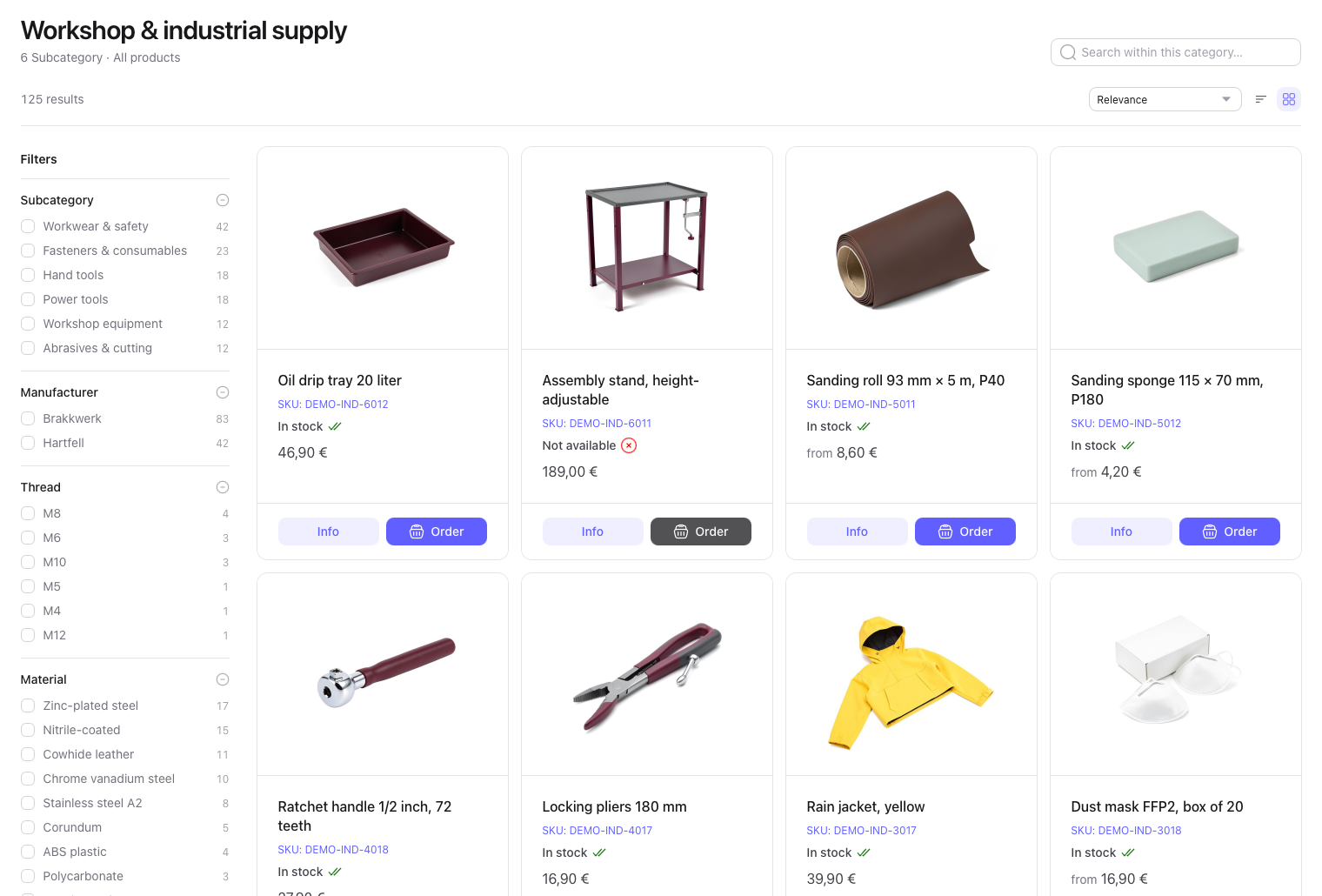
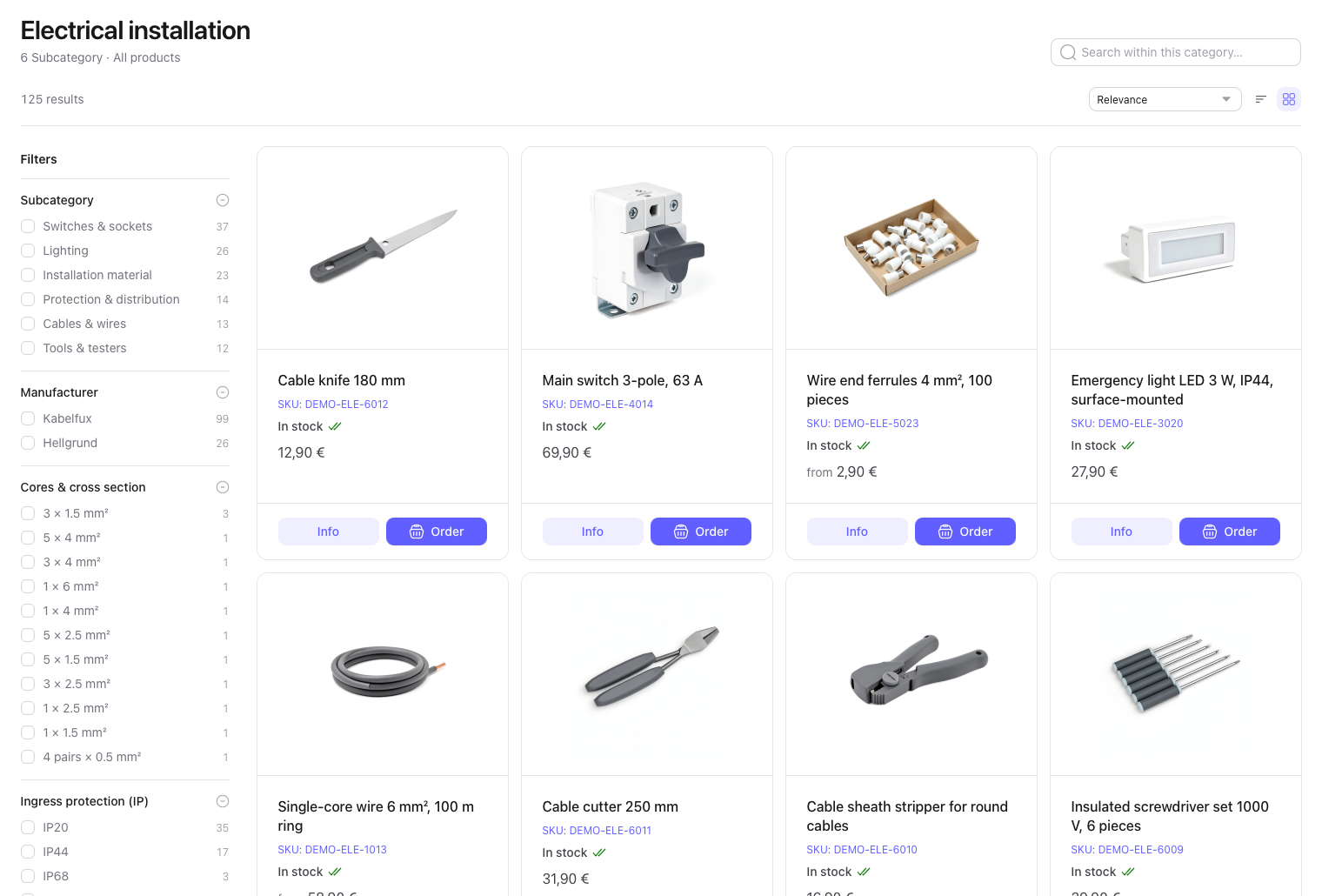
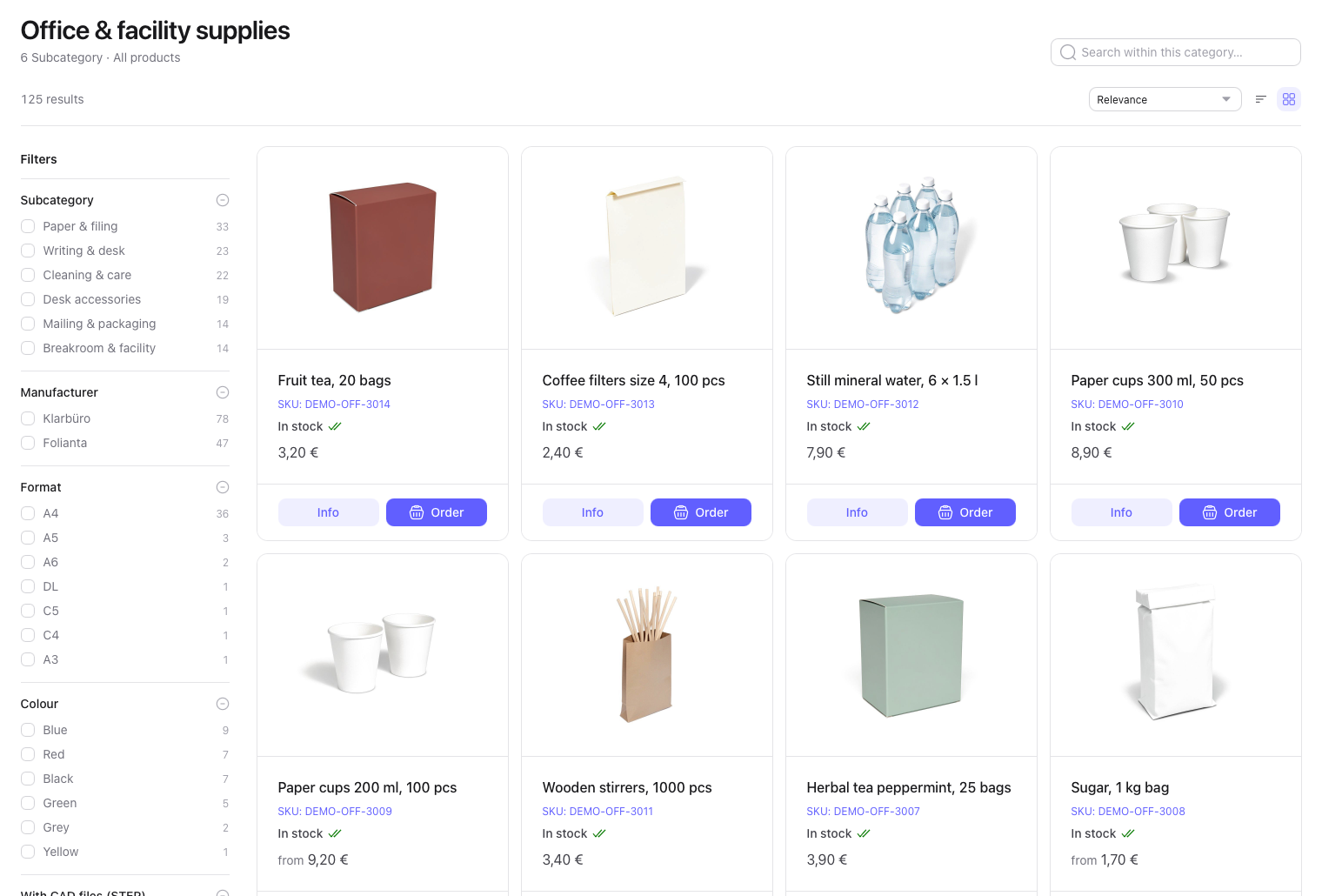
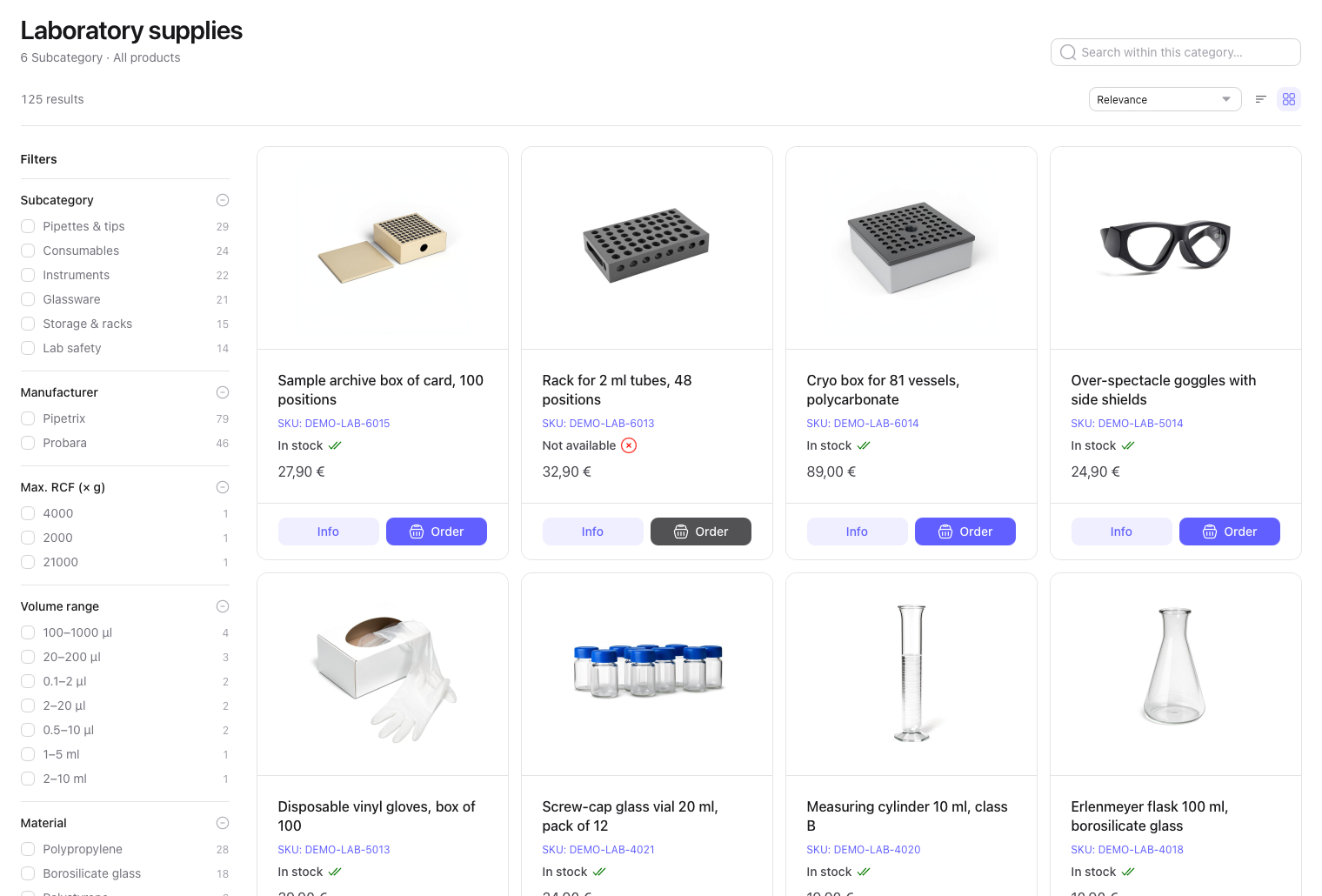
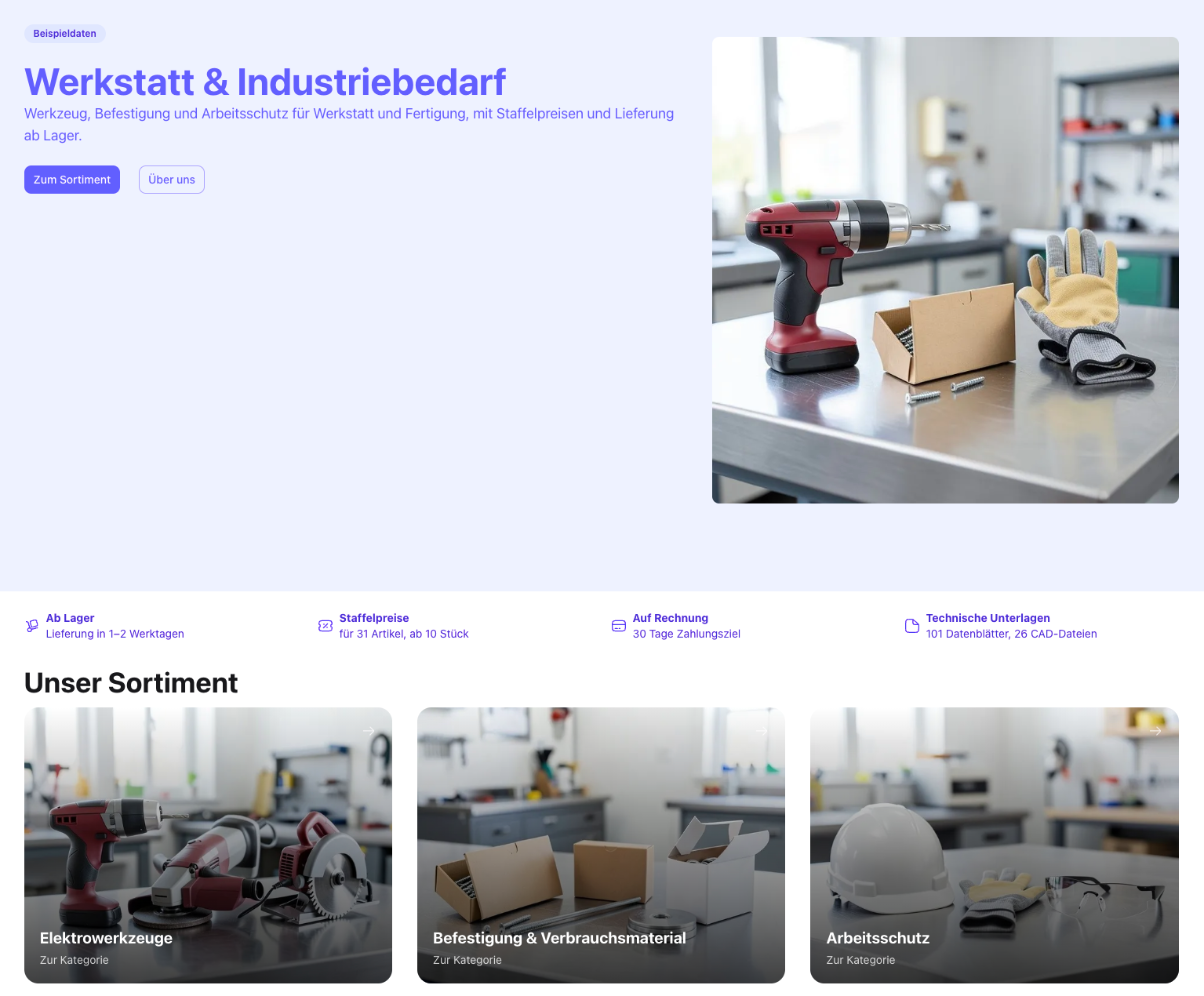
The loader looks every record up by its code first, so running it twice creates nothing the second time. A record on your tenant that already carries one of these codes is treated as sample data: a load updates it and a removal deletes it. The README has the full contents.
1. Get the data
git clone https://github.com/revenexx/sample-data.git
cd sample-data
The photos, drawings, data sheets and models are files in the repository, so nothing else is downloaded while loading. Run every command below from this folder, in the terminal where you exported the two variables. Instead of exporting them, you can copy .env.example to .env and fill it in; the loader reads it, and a variable set in your shell wins over .env. The API calls in step 4 read only the shell.
2. Load the base and a pack
./sample-data --load industrial --dry-run   # reads the tenant, lists what it would create or update, changes nothing
./sample-data --load industrial             # one pack, and the base if it is missing
--load takes industrial, electrical, office, lab or all, and can be repeated. Storage accepts 60 uploads a minute, so the loader spends most of a first run waiting out that limit on its own: one pack into an empty tenant takes about 10 minutes, all four about 40. The log shows one line per step, the base first:
Seeding tenant your-tenant
base
  ✓ tenant defaults        9 routes called
  ✓ market                 1 created, 0 updated
  …
pack: industrial
  ✓ categories             7 created, 0 updated
  ✓ files                  135 uploaded, 0 unchanged; 135 assets created, 0 updated
  ✓ products               125 created, 0 updated
  …
  ✓ content pages          3 created, 0 kept
In your shop (the storefront may add a language prefix, e.g. /de/lab):
  ✓ industrial  landing page /industrial
done
A model and each of its variants are separate product records, so a pack reports 125 products, and the root category counts as a seventh category. Run the same command again: no step creates anything, files are uploaded only when they changed, and stock is set to its target, not added on top. A later run still checks every record, so it takes about 4 minutes per pack. It also puts back what you changed by hand on sample products, prices and companies. A run that stopped halfway is finished by running it again.
Look at it in your shop. Nothing in your shop links to the packs' pages: the loader never changes your menus or your home page. The last lines of a load name them, so open /<pack> in your storefront; it may put a language prefix in front, such as /de/industrial. The storefront theme shows these pages in German on every language for now: it does not yet ask for the English translation. A path your tenant already has a page at is kept as it is and reported, never overwritten.
If a step fails, the line names the record and the API's answer. A 403 means the key lacks the scope for that app; a 404 on a whole route means the app is not installed. The command exits non-zero, so you can use it in CI.
The terminal UI. ./sample-data without flags opens a full-screen view instead: one row per pack with what is in your shop against what the pack holds, and a live log:
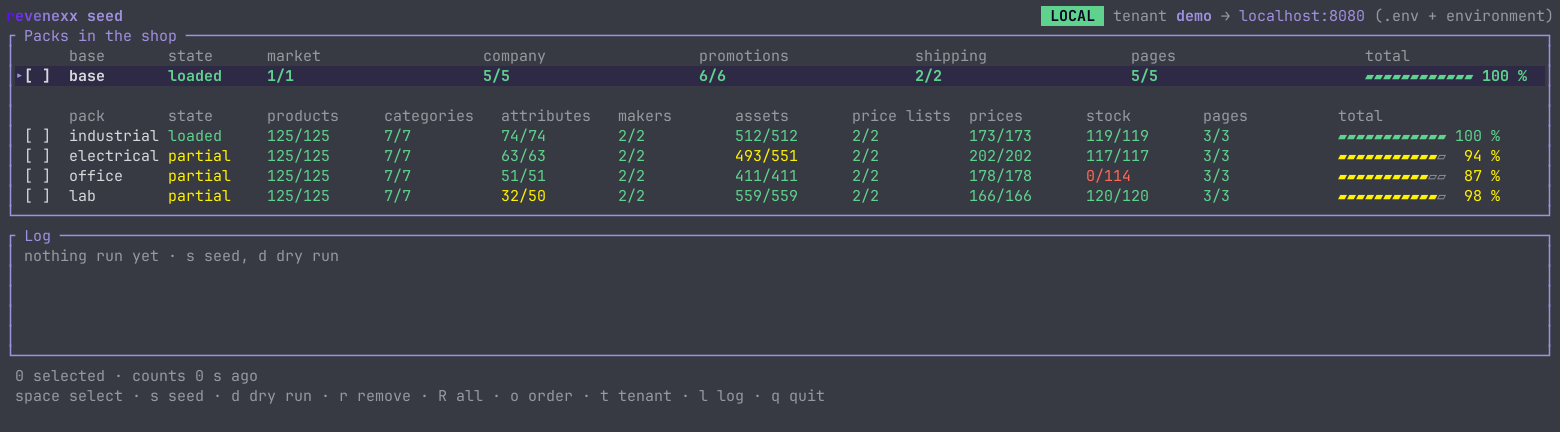
Select rows with space, press s to load, d for a dry run, r to remove, o to place a test order and q to quit. During a run the log fills step by step and a bar at the bottom shows the pack, the step and the time left:
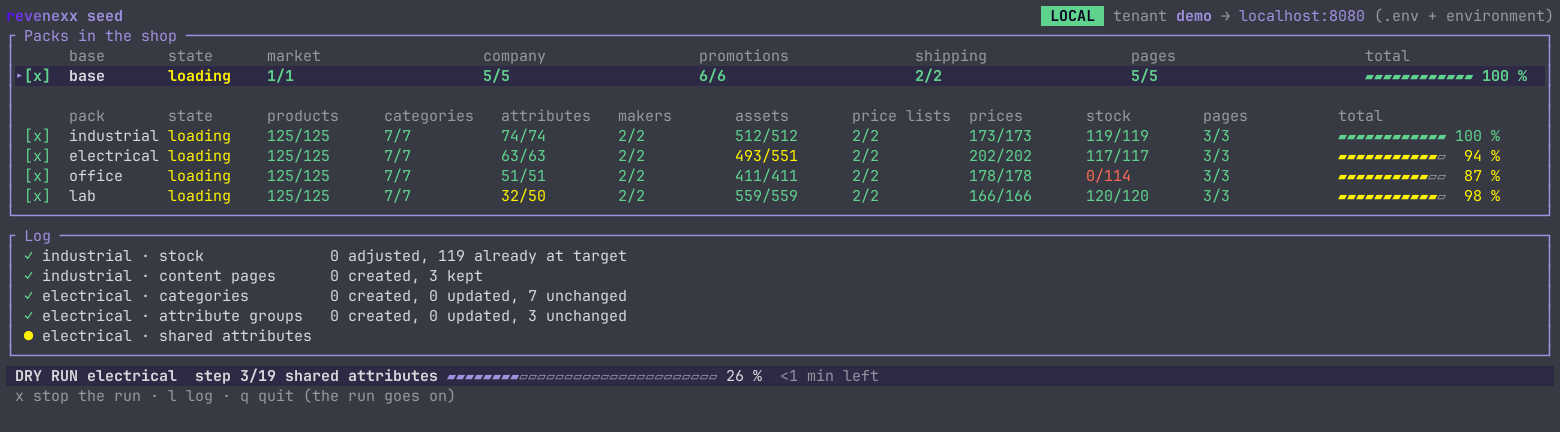
Its header marks a host that is not local as production, and there it asks you to type the tenant name before it loads or removes anything. A run is its own process: closing the UI does not stop it, and only one run goes at a time. ./sample-data --status shows the run that is going, ./sample-data --stop stops it.
3. Look at it in Cockpit
The products are under Commerce Studio → Products, with their categories, attributes and variants. The buyer company is under CRM, and the promotions are under Marketing. Every product has a photo and a close-up in use, every model a data sheet, and parts such as the hex bolt DEMO-IND-2002 also carry a technical drawing and a 3D model: open demo-ind-2002-hex-bolt-m8x40.step in the media library and it renders in the 3D viewer at its real size. The filterable yes/no attribute With CAD files (STEP) (demo_has_cad) finds every product with a 3D model.
4. Try prices, promotions and a test order
The examples use the industrial pack. The calls below use a small helper and the id of the buyer company; run them in one terminal:
api() { curl -s "${REVENEXX_BASE_URL:-https://api.revenexx.com/v1}$1" -H "X-Revenexx-Tenant: $REVENEXX_TENANT" \
  -H "X-Revenexx-Api-Key: $REVENEXX_API_KEY" -H 'Content-Type: application/json' "${@:2}"; }
ORG=$(api '/customers/organizations?customer_number=DEMO-C-1001' | jq -r '.items[0].id')
List price, quantity break, contract price. The cart asks for the same product twice, one box and twelve boxes of M8 bolts, so you see the quantity break. Without a company you get the list prices, net per box:
CART='[{"sku":"DEMO-IND-2002","quantity":1},{"sku":"DEMO-IND-2002","quantity":12}]'
api /prices/resolve -d "{\"items\":$CART}" \
  | jq -r '.prices[] | "\(.quantity) × \(.unit_price) € (\(.price_list.code))"'
1 × 12.5 € (DEMO-IND-LIST)
12 × 10.9 € (DEMO-IND-LIST)
For Muster Bau the contract price beats both:
api /prices/resolve -d "{\"organization_id\":\"$ORG\",\"items\":$CART}" \
  | jq -r '.prices[] | "\(.quantity) × \(.unit_price) € (\(.price_list.code))"'
1 × 8.9 € (DEMO-IND-CONTRACT)
12 × 8.9 € (DEMO-IND-CONTRACT)
Set up B2B pricing explains how the resolve call picks a list.
An automatic promotion. The evaluate call does not look prices up, so you send them with the cart. One drill at its list price of 129 € net gets 5 % off without a code:
api /promotions/evaluate -d '{"currency":"EUR","lines":[{"sku":"DEMO-IND-1001","quantity":1,"unit_price":129,"line_total":129}]}' \
  | jq -r '.applied[] | "\(.promotion_name): -\(.amount) €"'
5 % off from 100 € order value: -6.45 €
Two voucher codes. DEMO-WELCOME10 takes 10 % off a cart. DEMO-CREDIT150 is worth 150 € in total, takes at most 50 € off an order and draws down until nothing is left. This call only checks a code; the test order below redeems one:
api /promotions/codes/check -d '{"code":"DEMO-CREDIT150"}' | jq '{usable, remaining_value}'
{ "usable": true, "remaining_value": 150 }
A test order. ./sample-data --test-order takes the path a checkout takes. It needs the base and the industrial pack. It resolves the company's prices for a drill, bolts and safety glasses, evaluates promotions with DEMO-CREDIT150, asks for a shipping rate within Germany and an eligible payment method, places the order for the buyer contact and redeems the voucher.
Before you run it, know what it leaves behind:
- The order is real and stays. It shows up in Cockpit under Order management, and webhooks or an ERP connection on the tenant see it like any other order. Orders cannot be deleted, only cancelled (
POST /v1/orders/{id}/cancel). Every run places one more order. If you need a spotless tenant afterwards, place test orders only on a tenant you can throw away. - Removing the base cancels the test orders.
./sample-data --remove-basecancels the open orders the test order placed (referenceSAMPLE-TEST), gives their discounts back so the voucher regains its value, and then deletes the company and contact. The cancelled orders stay. The voucher and the promotions it used were redeemed, so they are disabled and archived instead of deleted; loading the data again reactivates them. - Nothing is charged. The order is placed with your key, not as a signed-in buyer, so no approval step applies, and it is paid by invoice.
The command says this too and asks before it places anything; on a host that is not local you also type the tenant name. --yes skips the questions, for scripts. To pick the voucher, run the script behind it directly:
./sample-data --test-order                               # with DEMO-CREDIT150, asks first
VOUCHER=DEMO-WELCOME10 ./examples/place-test-order.sh    # with another code, does not ask
VOUCHER= ./examples/place-test-order.sh                  # without a voucher, does not ask
…
6  the order
  ✓ ORD-000001: 248.48 EUR incl. tax
7  redeem the promotions
  ✓ DEMO-CREDIT150 has 100 € left
Order numbers and totals depend on your tenant. Run it three times and the voucher's remaining value goes from 150 to 100, 50 and 0 €; a fourth run places the order without a voucher discount. Run promotions and voucher codes covers evaluating and redeeming in your own checkout.
The repository's README lists more to try: shipping by weight, buyer and approver, low stock, variants and looking records up by their external_id.
5. Remove it
./sample-data --remove industrial                  # one pack
./sample-data --remove all --remove-base           # every pack and the base (market, company, promotions)
./sample-data --remove all --remove-base --dry-run
A removal deletes the records the loader created, found by their codes, permanently rather than to the trash, so you can load the data again later. The files it uploaded go too. Content pages are the exception: the Pages app has no permanent delete, so a removal moves the pages the loader created, and only those, to the Pages trash. A page in the trash no longer holds its path, so a later load creates the pages again; the old copies stay in the trash. Remove packs before or together with the base: the packs' contract prices belong to the base's company. The one exception is anything an order refers to: while a test order is open, the company, the buyer contact on it, the redeemed voucher and the promotions it used are deactivated instead (see step 4).
What it changes on your tenant
- Records with a
DEMO-ordemo_code and the records under them (the market's currency, locales and tax classes, attribute options, price entries, the shipping method's rate tiers, product assets and category links), and the files in the storage foldersample-data/<pack>. A removal deletes them again, the storage folder including any file you put there yourself. - Content pages marked as sample data in their metadata, at the paths listed in How the pieces fit. A removal moves them to the Pages trash.
- Events. Creating products, prices and the rest publishes the usual events, so a webhook or integration on the tenant sees the sample data arrive and leave.
- Created only if missing, never changed or removed: the product attributes
name,descriptionandimage(the main picture's storage key, which storefronts read) and the asset familiesproduct_images,technical_drawingsanddownloads, which your own data may use. - Your tenant's setup, created through the setup routes if missing: the standard sales channel and channel types, shipping carriers and methods, payment methods, order and return number ranges, customer roles and value lists, the standard price list, and the stock location
mainwith its availability states. Stock goes to the locationmain. A removal leaves all of these. - Orders stay.
--remove-basecancels the open test orders (referenceSAMPLE-TEST) and gives their discounts back; orders you placed yourself are never touched. A voucher or promotion that was ever redeemed is disabled or archived instead of deleted, and a company or contact with other open orders is blocked. Loading the data again reactivates them.
Nothing else on your tenant is changed or deleted.
Troubleshooting
| What you see | Why |
|---|---|
403 on a step | The key lacks the scope for that app; see the API key prerequisite at the top of this page. |
404 on a whole route | The app behind it is not installed on the tenant. |
| A run refuses with another run's name and start time | Only one run goes at a time, and one is still going, perhaps from a closed terminal UI. ./sample-data --status shows it, ./sample-data --stop stops it. |
ORG is null | The base is not loaded, or the tenant slug or key is wrong. |
DEMO-CREDIT150 answers usable: false | Its value is spent; the order script then places the order without a voucher discount. Reloading does not refill it; use VOUCHER=DEMO-WELCOME10 instead. |
| A step reports a record "exists but is not listed" | A record with that code is in the tenant's trash. Restore or empty it in Cockpit, then load again. |
Where to go next
- Model a catalog with attributes, families and variants explains the structure the packs use.
- Manage product images and documents covers the upload and asset calls behind the pack files.
- Import a BMECAT catalog brings your own catalogue in when you are done with the sample one.