Interactive use
Run at a terminal, the CLI guides you: you don't have to remember every group, command, and flag. Type as much as you know and it prompts for the rest — searching, selecting, and autocompleting as you go. Everything it prompts for can also be passed as a flag, so the same commands stay fully scriptable in CI.
Guided prompts appear only when the CLI is attached to an interactive terminal (a TTY) and you haven't asked for machine-readable output. In any other context it stays silent and behaves like a plain, flag-driven command — see When the CLI won't prompt.
Pick a command
Give a partial or misspelled command and the picker opens a searchable list, pre-filtered to the closest matches, so a typo never dead-ends. Choose a group and you get a second list of that group's commands; start typing to filter either list:
revenexx prod # → resolves to the products group, then its command picker
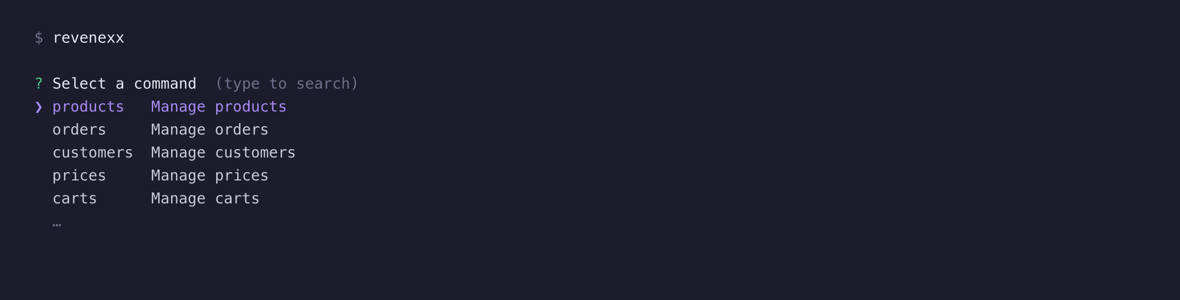
revenexx (with no command) now launches the full-screen app (TUI) instead of the picker — that's the CLI's default landing experience. To land on the guided picker instead, run a partial command as above, or opt out of the TUI default with REVENEXX_NO_TUI=1 or a defaultMode: guided key in .revenexx.yaml.Fill in missing options
Run a command without a required option and the CLI asks for it instead of failing. The prompt matches the option's type:
- Resource IDs — a searchable picker backed by the matching list endpoint. For
revenexx products get, it lists your products and lets you search by name, SKU, code, and the like; picking one supplies its ID. This is the search-and-autocomplete flow for the values you'd otherwise have to look up by hand. - Choices (enums) — a select list, or a multi-select checkbox when the option takes several values.
- True/false — a yes/no confirm.
- Secrets — a masked input for passwords, tokens, and API keys.
- Everything else — a plain input, validated for numbers, and split on commas or spaces for lists.
revenexx products get
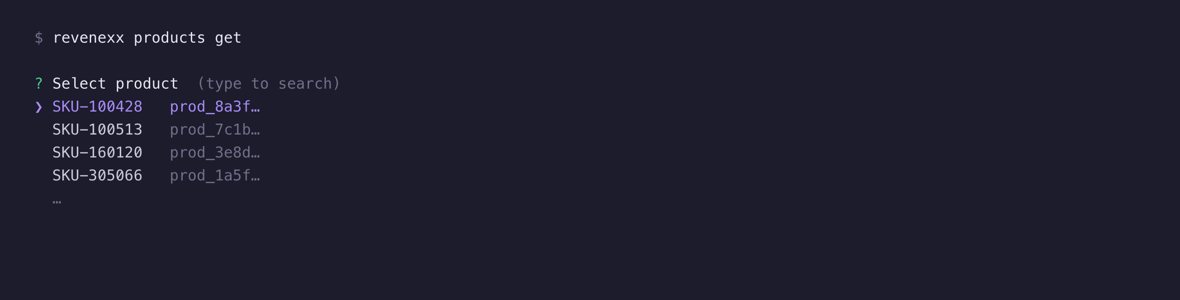
Supply the option up front and the prompt is skipped entirely:
revenexx products get --product-id prod_8a3f1c
Confirm destructive actions
Commands that delete data ask you to confirm first, defaulting to "no":
revenexx products delete --product-id prod_123

Skip the confirmation with --force (or -f) when you know what you're doing or you're running in a script:
revenexx products delete --product-id prod_123 --force
A guided session, end to end
Starting from nothing, let the CLI walk you the whole way:
revenexx                 # pick "products"
                         # pick "get"
                         # search and select a product
The exact same call, written out for a script or CI, bypasses every prompt:
revenexx products get --product-id prod_8a3f --json
When the CLI won't prompt
Guided prompts are suppressed — and the CLI falls back to plain, non-interactive behavior — whenever any of these is true:
- output isn't a terminal (piped, redirected, or running in CI),
- you passed
--json(or-j) for machine-readable output, - you asked for
--helpor the version.
In these modes a missing required option is a fast, predictable failure rather than a hanging prompt:
error: required option '--product-id <productId>' not specified
The command exits non-zero, so scripts fail loudly instead of waiting for input that will never come. For the full CI story — tokens, environment variables, and --force — see Non-interactive use.
What's next
- Browse every group and command in the command reference.
- Run the CLI headless in CI and scripts.