Server Side Rendering
Server Side Rendering (SSR) apps generate HTML content dynamically on the server for each request and send fully rendered pages to the browser. This approach improves performance for the initial load and enhances SEO since search engines can easily index the content. While SSR can be slightly slower than static apps due to server-side processing, it provides a good balance between performance and interactivity.
Since revenexx's CDN supports dynamic content delivery, any server-side processing implemented in your storefront will be executed at your user's nearest edge location. The CDN also uses advanced compression algorithms to reduce data transfer sizes and improve delivery times of your storefront content. Any data relevant to other revenexx products that you have integrated in your storefront, such as Auth, Databases, Storage, Functions, and Messaging, will be served from your project's pre-selected region.
Configuring your revenexx Storefront to use SSR
When revenexx builds your storefront for the first time, it scans your project's configuration files to determine whether the storefront should be rendered as static pages or using SSR.
If you need to manually update these settings, here are the steps to do so:
- Navigate to your storefront in the revenexx Console and head to the Settings tab > Build settings section
- Select the Server side rendering checkbox (you may need to update your project codebase depending on your framework option)
- Confirm that the appropriate install command, build command, and output directory are set
- Click on the Update button and redeploy your storefront
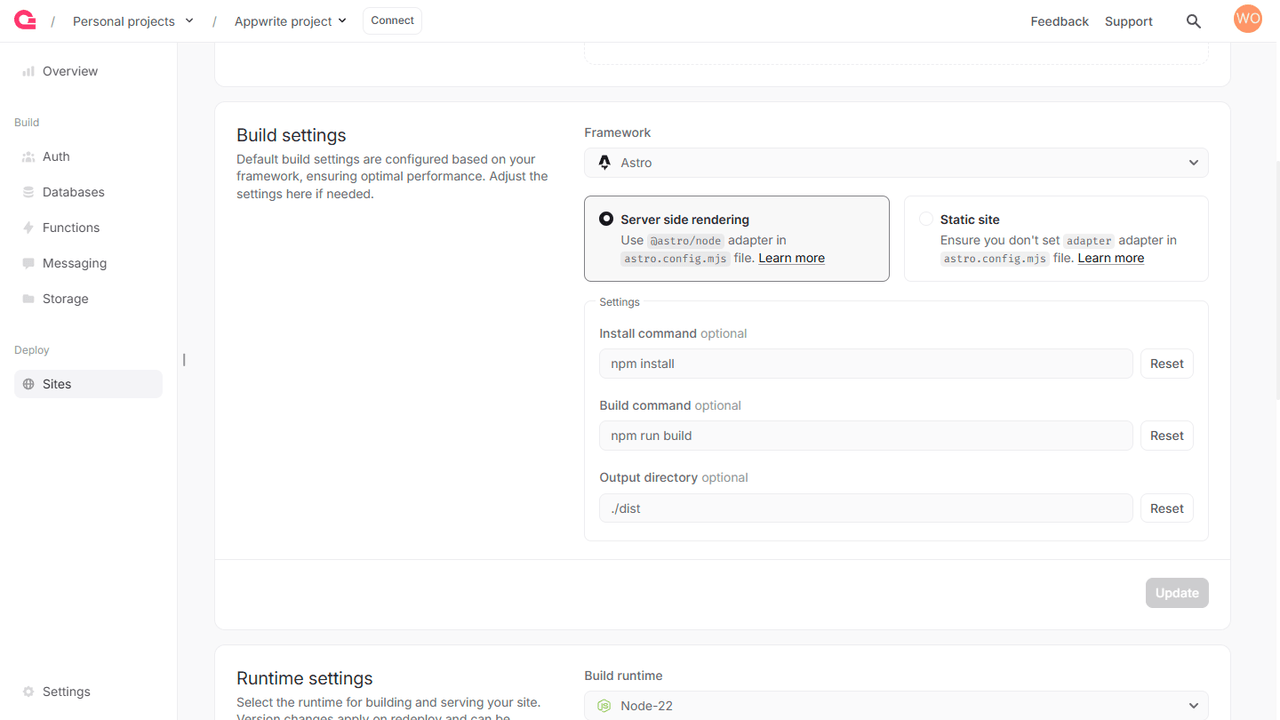
Enabling SSR builds on your web app
To enable SSR builds for your web app, you may need to make some additional updates in case of the following frameworks:
Analog
Set ssr: true in analog plugin in the vite.config.ts file.
Angular
Ensure the src/server.ts file uses @angular/ssr/node package.
Next.js
The following output modes are supported:
- Default mode: No
outputconfiguration needed innext.config.js. - Standalone mode: Set
outputtostandaloneinnext.config.jsfor smaller build sizes, lesser build times and cold start times.
Nuxt
Set build command to npm run build in site settings.
SvelteKit
Use @sveltejs/adapter-node adapter in the svelte.config.js file.
Astro
Use @astrojs/node adapter in the astro.config.mjs file.
Remix
Ensure the entry.server.tsx file uses @remix-run/node package.
TanStack Start
No additional configuration is needed as SSR is enabled by default.
revenexx-specific environment variables
You can access several environment variables pertaining to your revenexx project in SSR apps.
| Variable | Description | Available at Build and/or Run Time |
|---|---|---|
REVENEXX_SITE_API_ENDPOINT | The API endpoint of the running site | Both |
REVENEXX_SITE_NAME | The name of the running site. | Both |
REVENEXX_SITE_DEPLOYMENT | The deployment ID of the running sites. | Both |
REVENEXX_SITE_PROJECT_ID | The project ID of the running site. | Both |
REVENEXX_SITE_RUNTIME_NAME | The runtime name of the running site. | Both |
REVENEXX_SITE_RUNTIME_VERSION | The runtime version of the running site. | Both |
REVENEXX_SITE_CPUS | The CPU (runtime) specification of the running site. | Both |
REVENEXX_SITE_MEMORY | The memory (runtime) specification of the running site. | Both |