Static
Static apps, also known as static storefronts, consist of pre-built HTML, CSS, and JavaScript files that are served to users without any backend processing. These apps do not execute server-side code on each request, meaning the content remains the same until manually updated or rebuilt.
Since the pages are pre-generated, static apps offer incredibly fast load times. However, they lack dynamic interactivity and are best suited for use cases like personal portfolios, documentation sites, and landing pages.
All static content served from revenexx's CDN is optimized using advanced compression algorithms to reduce data transfer sizes and then served from your user's nearest edge location.
Configuring your revenexx Storefront to use static hosting
When revenexx builds your storefront for the first time, it scans your project's configuration files to determine whether the storefront should be rendered as static pages or using SSR.
If you need to manually update these settings, here are the steps to do so:
- Navigate to your storefront in the revenexx Console and head to the Settings tab > Build settings section
- Select the Static site checkbox (you may need to update your project codebase depending on your framework option)
- Confirm that the appropriate install command, build command, and output directory are set
- Click on the Update button and redeploy your storefront
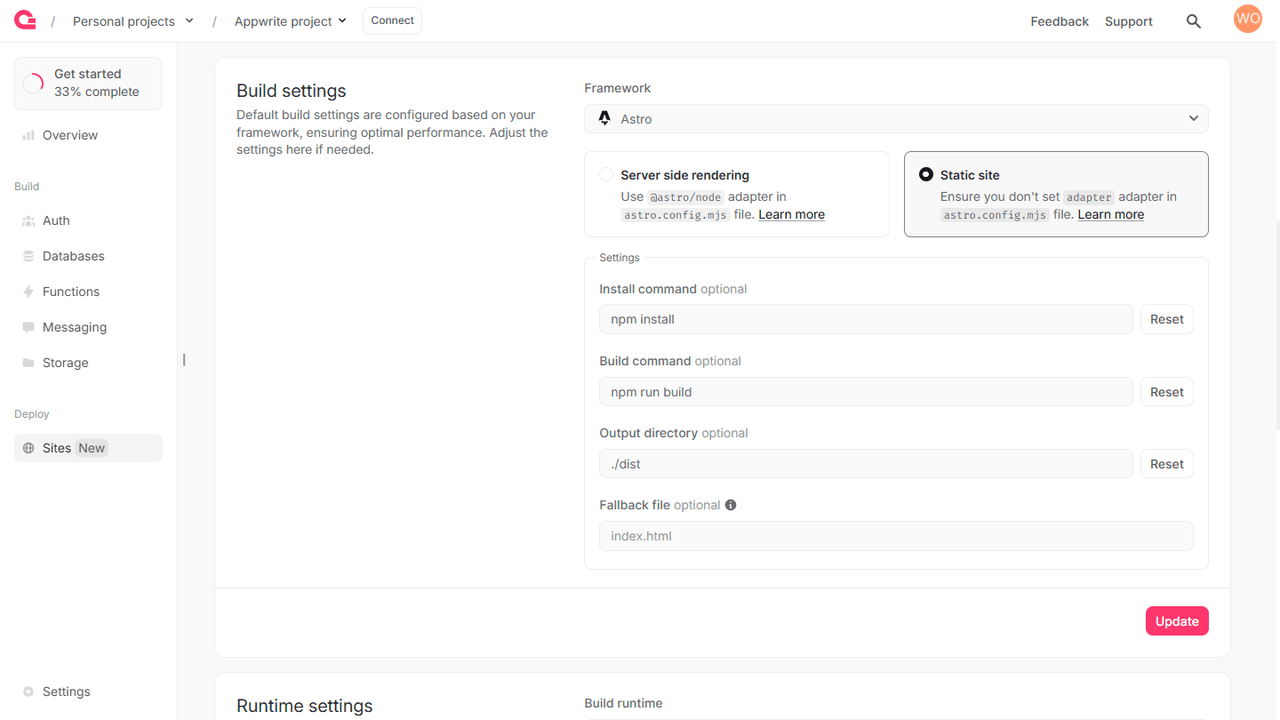
Enabling static builds on your web app
To enable static builds for your web app, you may need to make some additional updates in case of the following frameworks:
Analog
Set static: true in analog plugin in the vite.config.ts file.
Next.js
Set output: export in the next.config.js.
Nuxt
Set build command to npm run generate in site settings.
SvelteKit
Use @sveltejs/adapter-static adapter in the svelte.config.js file.
Astro
Ensure you don't set adapter in the astro.config.mjs file.
Remix
Set ssr: false in remix plugin in the vite.config.ts file.
TanStack Start
Add prerender option with the enabled: true option set in the tanstackStart configuration in the vite.config.ts file.
Running SPAs on revenexx Storefronts
Single Page Applications (or SPAs) are web applications that load a single HTML page and dynamically update content using JavaScript, typically leveraging frameworks like React, Vue, or Angular. Unlike traditional storefronts, SPAs do not require full-page reloads; instead, they use client-side routing to modify the URL and fetch new content asynchronously from APIs. This results in a smoother, more app-like user experience.
revenexx Storefronts allows hosting SPAs through the static hosting method. Instead of returning all pre-rendered HTML pages, it allows your client to download relevant JavaScript files, which can then run in the browser.
Configuring an revenexx Storefront to run as an SPA
To configure an revenexx Storefront to run as an SPA, you must do the following:
- Navigate to your storefront in the revenexx Console and head to the Settings tab > Build settings section
- Select the Static site checkbox (you may need to update your project codebase depending on your framework option)
- Confirm that the appropriate install command, build command, and output directory are set
- Provide a fallback file for advanced routing and proper page handling.
- Click on the Update button and redeploy your storefront.